 Webhooker
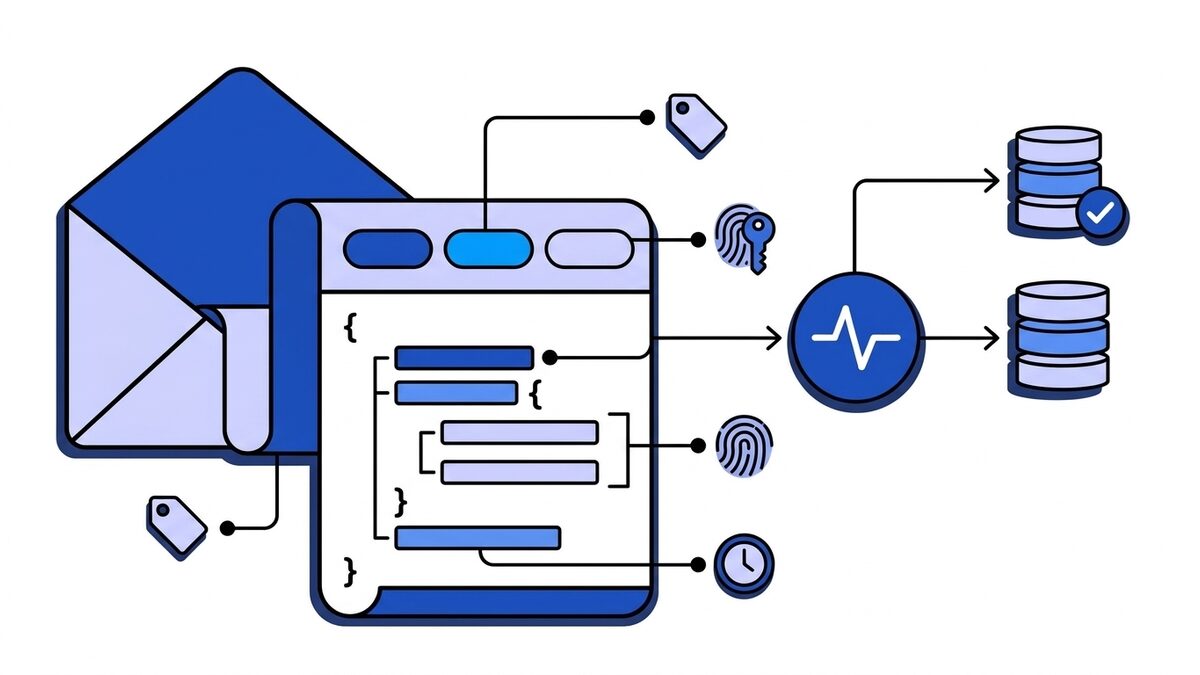
A webhook payload is the body of the HTTP request a provider sends to your webhook URL when an event happens. In almost every modern API it is a JSON object, sent with POST and Content-Type: application/json, and it describes one event: what happened (type), a unique ID for that event, when it happened, and the data of the object that changed. The rest of what you need to process it, such as the event name, a delivery ID and the signature, often travels in the HTTP headers, not in the body.
That is the short answer. The longer one matters because no two providers agree on the details. GitHub puts the event name in a header and not in the body. Stripe wraps everything in an envelope with data.object. Shopify sends the bare resource with no envelope at all. Slack sends JSON for some features and form-encoded bodies for others. If your handler assumes one shape, the second provider you integrate will break it.
Anatomy of a webhook request
A webhook delivery is an ordinary HTTP request. Here is a trimmed GitHub push delivery as it arrives on the wire:
POST /in/github HTTP/1.1
Host: app.example.com
User-Agent: GitHub-Hookshot/7f3a2b1
Content-Type: application/json
Content-Length: 7412
X-GitHub-Event: push
X-GitHub-Delivery: 7c4e1a30-9f2b-11ef-8a6e-2b5c9d1e4f00
X-GitHub-Hook-ID: 512345678
X-Hub-Signature-256: sha256=3f1c9d0a6e...b27e

{"ref":"refs/heads/main","before":"9d2e...","after":"a41c...","repository":{"id":123456789,"full_name":"acme/api", ...},"pusher":{"name":"octocat", ...},"sender":{"login":"octocat", ...},"commits":[...]}
Four parts carry meaning:
| Part | What it tells you | GitHub example |
|---|---|---|
| Method | Almost always POST. See webhook GET vs POST for the exceptions | POST |
Content-Type | How to decode the body | application/json |
| Provider headers | Event type, delivery ID, signature, sometimes a timestamp | X-GitHub-Event, X-GitHub-Delivery, X-Hub-Signature-256 |
| Body | The event data itself | The push: ref, commits, repository, sender |
The split between headers and body is the first thing to learn for each provider. GitHub’s body for a push does not contain the word push anywhere: if you log only bodies, you lose the event type.
The four fields every payload needs
Strip away the provider-specific detail and a useful webhook payload answers four questions. Where each answer lives differs:
| Question | Stripe | GitHub | Shopify | Slack Events API |
|---|---|---|---|---|
| What happened? | type in body | X-GitHub-Event header plus action in body | X-Shopify-Topic header | event.type in body |
| Which event is this? (unique ID) | id (evt_...) in body | X-GitHub-Delivery header | X-Shopify-Webhook-Id header | event_id in body |
| When did it happen? | created (Unix seconds) | Timestamps inside the object, no event time | X-Shopify-Triggered-At header | event_time (Unix seconds) |
| What changed? | data.object, plus data.previous_attributes on updates | The whole body | The whole body is the resource | event object |
The unique ID is the one most handlers forget to store. Providers deliver at least once, so the same event can arrive twice: after a timeout, a retry or a manual redelivery. The ID is how you notice. The idempotency guide covers how to use it.
The timestamp matters for a related reason. Webhooks can arrive out of order, so “the latest one wins” needs a time or a version to compare, not arrival order. The ordered delivery post goes into that.
JSON, form-encoded and the rest
The Content-Type header decides how you read the body. Four values cover nearly everything you will meet:
| Content-Type | Who sends it | How to read it |
|---|---|---|
application/json | Stripe, GitHub hooks set to json, Shopify, Slack Events API, Discord, most modern APIs | Parse as JSON, after verifying the signature on the raw bytes |
application/x-www-form-urlencoded | Twilio, Slack slash commands and interactivity, GitHub hooks set to form | Parse key-value pairs; some providers put a JSON string inside one field |
application/xml or text/xml | Older enterprise systems, Shopify subscriptions created with format: xml | Parse as XML |
application/cloudevents+json | Services that follow the CloudEvents spec in structured mode | JSON with a fixed envelope, see below |
Form-encoded bodies deserve a closer look, because two providers use them in a way that trips people up.
Slack interactivity sends application/x-www-form-urlencoded with a single field called payload, whose value is a JSON string. You URL-decode the body, take the payload field, then parse it as JSON:
payload=%7B%22type%22%3A%22block_actions%22%2C%22user%22%3A%7B%22id%22%3A%22U0123%22%7D...GitHub with content_type: form does the same thing: the whole event is a JSON string inside payload=. The REST API defaults content_type to form when a script leaves it out, and old hooks often still use it, so a JSON parser fails on a body that starts with payload=%7B and the error looks like corrupted data.
Twilio sends plain form fields (From, To, Body, MessageSid) with no JSON at all, and signs the full URL plus the sorted form parameters rather than the raw body.
The rule that follows: branch on Content-Type, never assume it.
Real payloads, side by side
GitHub
GitHub sends one JSON object per delivery, and the event type is in the X-GitHub-Event header. Most events also have an action field in the body: a pull_request event can be opened, closed, synchronize and a dozen more, all under the same header value. Almost every payload includes sender and, for repository events, repository; organisation and app events add organization and installation.
{
  "action": "opened",
  "number": 42,
  "pull_request": {
    "id": 2048123456,
    "title": "Add retry jitter",
    "state": "open",
    "head": { "ref": "feature/jitter", "sha": "a41c..." },
    "base": { "ref": "main" }
  },
  "repository": { "id": 123456789, "full_name": "acme/api", "private": true },
  "sender": { "login": "octocat", "id": 583231, "type": "User" }
}
The webhook object itself, the thing you create with the REST API, has its own small schema. This is where content_type lives, and it decides whether the payload above arrives as JSON or wrapped in a form field:
curl -X POST https://api.github.com/repos/acme/api/hooks \
  -H "Authorization: Bearer $GITHUB_TOKEN" \
  -H "Accept: application/vnd.github+json" \
  -d '{
    "name": "web",
    "active": true,
    "events": ["push", "pull_request"],
    "config": {
      "url": "https://app.webhooker.eu/in/your-token",
      "content_type": "json",
      "secret": "a-long-random-string",
      "insecure_ssl": "0"
    }
  }'
config.content_type accepts json or form and defaults to form, so always set it. events takes event names, or ["*"] for all of them. secret turns on the X-Hub-Signature-256 header. GitHub caps payloads at 25 MB and does not deliver events above that size, which mostly affects very large pushes. The full set of events and headers is in the GitHub webhooks guide.
Stripe
Stripe wraps every event in the same envelope, an Event object:
{
  "id": "evt_1Q2w3E4r5T6y7U8i",
  "object": "event",
  "api_version": "2025-03-31.basil",
  "created": 1791200000,
  "type": "invoice.payment_failed",
  "livemode": false,
  "pending_webhooks": 1,
  "request": { "id": null, "idempotency_key": null },
  "data": {
    "object": {
      "id": "in_1Q2w3E4r5T6y7U8i",
      "object": "invoice",
      "customer": "cus_Q2w3E4r5T6y7",
      "amount_due": 4900,
      "currency": "eur",
      "attempt_count": 2,
      "status": "open"
    }
  }
}
The envelope never changes; data.object changes with type. On *.updated events Stripe adds data.previous_attributes with the old values of the fields that changed, which saves you a lookup when you only care whether, say, status moved. The shape of data.object follows the api_version on the endpoint, not the one your code uses, so pin the endpoint’s version on purpose. The Stripe webhooks guide lists the events most integrations need.
Stripe’s newer event destinations can also send thin events: a small envelope with the event type and a reference to the related object, without its data. Your handler fetches the current state from the API. Thin payloads are smaller and never stale, at the cost of one API call per event.
Shopify
Shopify sends the resource itself as the body, with no envelope. An orders/create webhook body is an Order object; a products/update body is a Product. Everything about the event is in headers:
X-Shopify-Topic: orders/create
X-Shopify-Shop-Domain: acme-store.myshopify.com
X-Shopify-API-Version: 2026-07
X-Shopify-Webhook-Id: 5f8d2a3b-0c1e-4d6f-9a7b-1c2d3e4f5a6b
X-Shopify-Event-Id: 98880550-7158-44d4-b7cd-2c97c8a091b5
X-Shopify-Triggered-At: 2026-10-05T09:12:44.512Z
X-Shopify-Hmac-Sha256: XWmrwMey6OsLMeiZKwP4FppHH3cmAiiJJAweH5Jo4bM=
{
"id": 820982911946154508,
"admin_graphql_api_id": "gid://shopify/Order/820982911946154508",
"email": "jon@example.com",
"created_at": "2026-10-05T11:12:41+02:00",
"currency": "EUR",
"total_price": "199.00",
"financial_status": "paid",
"line_items": [{ "id": 466157049, "title": "Hoodie", "quantity": 1, "price": "199.00" }],
"customer": { "id": 115310627314723954, "first_name": "Jon", "last_name": "Doe" }
}Deduplicate on X-Shopify-Webhook-Id, which identifies one delivery. X-Shopify-Event-Id is shared by every topic fired by the same merchant action, so an orders/create and the orders/paid that follows carry the same value.
Two more details catch people. Money is a string ("199.00"), not a number. And IDs such as 820982911946154508 are larger than JavaScript’s safe integer limit, a problem covered below. More on Shopify’s topics and headers in the Shopify webhooks guide.
Slack Events API
Slack wraps each event in an outer object and puts the actual event under event:
{
  "token": "XXYYZZ",
  "team_id": "T0123ABCD",
  "api_app_id": "A0123ABCD",
  "type": "event_callback",
  "event_id": "Ev08MFMKH6",
  "event_time": 1791200000,
  "event": {
    "type": "message",
    "channel": "C0123ABCD",
    "user": "U0123ABCD",
    "text": "deploy finished",
    "ts": "1791200000.000200"
  }
}
The same endpoint also receives {"type": "url_verification", "challenge": "..."} once, when you save the URL, and must echo the challenge back. So the outer type decides what to do before you look at event.type. See the Slack webhooks guide for the incoming-webhook direction, which is a different feature.
Envelope standards: Standard Webhooks and CloudEvents
Two specs try to end the “every provider is different” problem.
Standard Webhooks fixes the headers and recommends a body shape. Every delivery carries webhook-id, webhook-timestamp and webhook-signature (an HMAC-SHA256 of id.timestamp.body, base64-encoded with a v1, prefix). The recommended body is:
{
  "type": "invoice.paid",
  "timestamp": "2026-10-05T09:12:44.512Z",
  "data": { "invoice_id": "inv_123", "amount": 4900, "currency": "EUR" }
}CloudEvents, from the CNCF, standardises the event envelope with required attributes specversion, id, source and type, plus optional time, subject and datacontenttype. In structured mode they sit in the JSON body; in binary mode they move to ce- prefixed headers and the body carries only data.
If you consume webhooks, these specs mean one verification function and one parser for every provider that adopts them. If you send webhooks, picking one saves your users from writing yet another custom handler.
Fat vs thin payloads
Providers make a design choice that changes how you write handlers:
| Fat payload (full object) | Thin payload (reference only) | |
|---|---|---|
| Example | Stripe snapshot events, Shopify, GitHub | Stripe thin events, many CRMs, some HubSpot subscriptions |
| Handler work | Read the body, act | Fetch the object from the API, then act |
| Stale data risk | Yes, the snapshot can be older than the current state | No, you read the current state |
| Order problems | Two updates out of order can overwrite newer data with older | Fetching on each event always returns the latest |
| Personal data in transit | Whatever the object contains | Only IDs |
| API rate limits | Not affected | One call per event, can hit limits under bursts |
A practical middle ground with fat payloads: treat the body as a notification and a hint, and re-fetch the object when the order of updates matters, as with subscription status or inventory counts.
Parsing mistakes that break handlers
Parsing before verifying. Providers sign the exact bytes they send. If your framework parses JSON first and you re-serialise it to check the signature, key order, whitespace or Unicode escaping can change and the check fails. Read the raw body, verify, then parse. This is the top cause of failed signature verification.
Large integer IDs in JavaScript. JSON.parse turns 820982911946154508 into 820982911946154500. The ID silently points at a different order. Use the string form when the provider offers one (Shopify’s admin_graphql_api_id, Twitter-style id_str), or parse with a big-integer aware library.
Money as floats. Stripe sends integer minor units (4900 means €49.00); Shopify sends decimal strings. Neither should become a float in your code.
Rejecting unknown fields. Providers add fields without a version bump. A strict schema that fails on unexpected keys turns a harmless API change into an outage. Validate the fields you use and ignore the rest.
Treating null and missing as the same. In a Stripe update, a field set to null was cleared; a field absent from previous_attributes did not change. Mixing them up writes wrong data.
Mixing timestamp formats. Stripe and Slack use Unix seconds, Shopify and GitHub use ISO 8601 strings with offsets. Normalise to UTC at the edge.
Assuming the charset. Content-Type: application/json implies UTF-8, but form and XML bodies can declare other encodings. Read the charset parameter when it is there.
Doing the work inside the request. Most providers time out after 5 to 30 seconds and retry. Store the payload, answer 2xx, process later. The retries guide explains what happens when you do not.
Inspect a real payload before you write code
Provider docs show sample payloads, but real ones differ: fields that are null in production, nested arrays the sample left empty, headers the docs never mention. Capture one before you write the handler.
The quickest way is a temporary URL from the online webhook tester. Point the provider at it, trigger an event and read the method, headers and body as they arrived. Paste your signing secret and it checks Stripe, GitHub, Shopify, Slack and Standard Webhooks signatures in the browser. Save the raw body byte for byte as a test fixture; the webhook testing guide shows how to build tests on it.
Designing a payload if you send webhooks
If your product sends webhooks, a few choices save your users a lot of handler code:
- Use one envelope for every event:
id,type, a timestamp anddata. Standard Webhooks’ shape is a good default. - Make the ID stable across retries, so a redelivery has the same ID as the original and receivers can deduplicate.
- Put the event type in the body, not only in a header. People log bodies.
- Version the payload, either per endpoint like Stripe’s
api_versionor with a version field, and never change a field’s type within a version. - Send IDs as strings if they can exceed 2^53.
- Keep personal data to what the receiver needs. Every extra field is one more copy of personal data in someone’s logs and queues. The GDPR guide to webhook payloads covers what counts.
- Sign the raw body with HMAC-SHA256 and a timestamp, and document the exact string you sign. See webhook signature verification.
- Publish a size limit and stick to it. Receivers often cap request bodies at 1 MB or less.
How Webhooker handles payloads
Webhooker sits between providers and your services as an EU-hosted webhook gateway. It accepts webhooks on POST, PUT, PATCH and DELETE with any content type, verifies the provider’s signature on the raw bytes, and stores the body and headers as they arrived, so the delivery log shows exactly what the provider sent. Without transformations, your destination receives the same bytes.
When you do want to change a payload, gateways can filter events on header and JSON body fields, set, rename or remove headers, and merge extra fields into JSON bodies; non-JSON bodies pass through unchanged. Ingest URLs accept bodies up to 1 MB.
Summary
A webhook payload is the request body of one event delivery, usually JSON, but the full message is the body plus its headers. Learn where each provider keeps the event type, the unique event ID, the timestamp and the changed data, branch on Content-Type rather than assuming JSON, and verify the signature on the raw bytes before you parse anything. Then capture a real delivery and build your handler and its tests on that, not on the sample in the docs.














